 Robo
b5a6aa14a8
Robo
b5a6aa14a8
* feat: move from yarn to npm

* chore: skip yarn.lock files

* fix: playwright download

* chore: fix compile and hygiene

* chore: bump vsce@2.17.0

Refs https://github.com/microsoft/vscode-vsce/commit/8b49e9dfdf909ad3af2b9ec9c825f5b501f6d75e

* test: update results for bat and sh colorizer tests

* fix: add missing lock files for windows

* fix: switch to legacy-peer-deps

* chore: update markdown-it@14.1.0

Refs https://github.com/markdown-it/markdown-it/commit/737c95a12976357df99652e4b51d831cac4a75aa

esbuild step in extensions-ci-pr was previously using markdown-it
from root which had userland punycode and was able to compile successfully.

* ci: increase pr timeout for windows integration tests

* chore: fix product build

* build: ignore extension dev dependency for rcedit

* build: fix working directory inside container

* build: fix dependency generation

* npm: update dependencies

* ci: use global npmrc

* ci: update cache

* ci: setup global npmrc for private npm auth

* build: fix extension bundling

* chore: sync npm dependencies

* ci: debug env variables for container

* ci: fix win32 cli pipeline

* build: fix npmrc config usage for build/ and remote/ dirs

* fix: windows build

* fix: container builds

* fix: markdown-language-features tests and bundling

```
[03:58:22] Error: Command failed: /Users/demohan/.nvm/versions/node/v20.15.1/bin/node /Users/demohan/github/vscode/extensions/markdown-language-features/esbuild-notebook.js --outputRoot /Users/demohan/github/vscode/.build/extensions/markdown-language-features
✘ [ERROR] Could not resolve "punycode"

    extensions/markdown-language-features/node_modules/markdown-it/lib/index.js:14:27:
      14 │ var punycode     = require('punycode');
         ╵                            ~~~~~~~~~~

  The package "punycode" wasn't found on the file system but is built into node. Are you trying to bundle for node? You can use "platform: 'node'" to do that, which will remove this error.
```

Adds userland package based on https://github.com/markdown-it/markdown-it/commit/beed9aee2c1b44819afc25d485e86a6c699b6ef0

* fix: container builds for distro

* chore: update yarn occurrences

* fixup! chore: bump vsce@2.17.0

Uses the closest version to `main` branch that does not
include https://github.com/microsoft/vscode-vsce/commit/d3cc84cdec99b8e9f24be63d1a2a54abe908f68b
while still having the fix https://github.com/microsoft/vscode-vsce/commit/8b49e9dfdf909ad3af2b9ec9c825f5b501f6d75e

* chore: sync npm dependencies

* chore: sync npm dependencies

* chore: sync npm dependencies

* chore: throw error when yarn is used for installation

* chore: add review feedback

* chore: switch exec => run where needed

* chore: npm sync dependencies

* fix: markdown-language-features bundling

```
✘ [ERROR] Could not resolve "punycode"

    extensions/markdown-language-features/node_modules/markdown-it/lib/index.js:14:27:
      14 │ var punycode     = require('punycode');
         ╵                            ~~~~~~~~~~

  The package "punycode" wasn't found on the file system but is built into node. Are you trying to bundle for node? You can use "platform: 'node'" to do that, which will remove this error.
```

Adds missing userland package based on markdown-it/markdown-it@beed9ae,
can be removed once we update markdown-it >= 14.1.0

* ci: rename no-yarn-lock-changes.yml

* chore: sync npm dependencies

* ci: restore no-yarn-lock-changes.yml

We can disable it in a separate PR to keep the required
checks happy and also need workflow edit perms.

* chore: sync npm dependencies

* ci: rebuild cache

* ci: fix no-package-lock-changes.yml

* chore: bump distro

* chore: rm yarn.lock files

* chore: rm yarn.lock files without dependencies

* chore: add vscode-selfhost-import-aid to postinstall dirs

* chore: bump distro
References View
This extension shows reference search results as separate view, just like search results. It complements the peek view presentation that is also built into VS Code. The following feature are available:
- List All References via the Command Palette, the Context Menu, or via Alt+Shift+F12
- View references in a dedicated tree view that sits in the sidebar
- Navigate through search results via F4 and Shift+F4
- Remove references from the list via inline commands
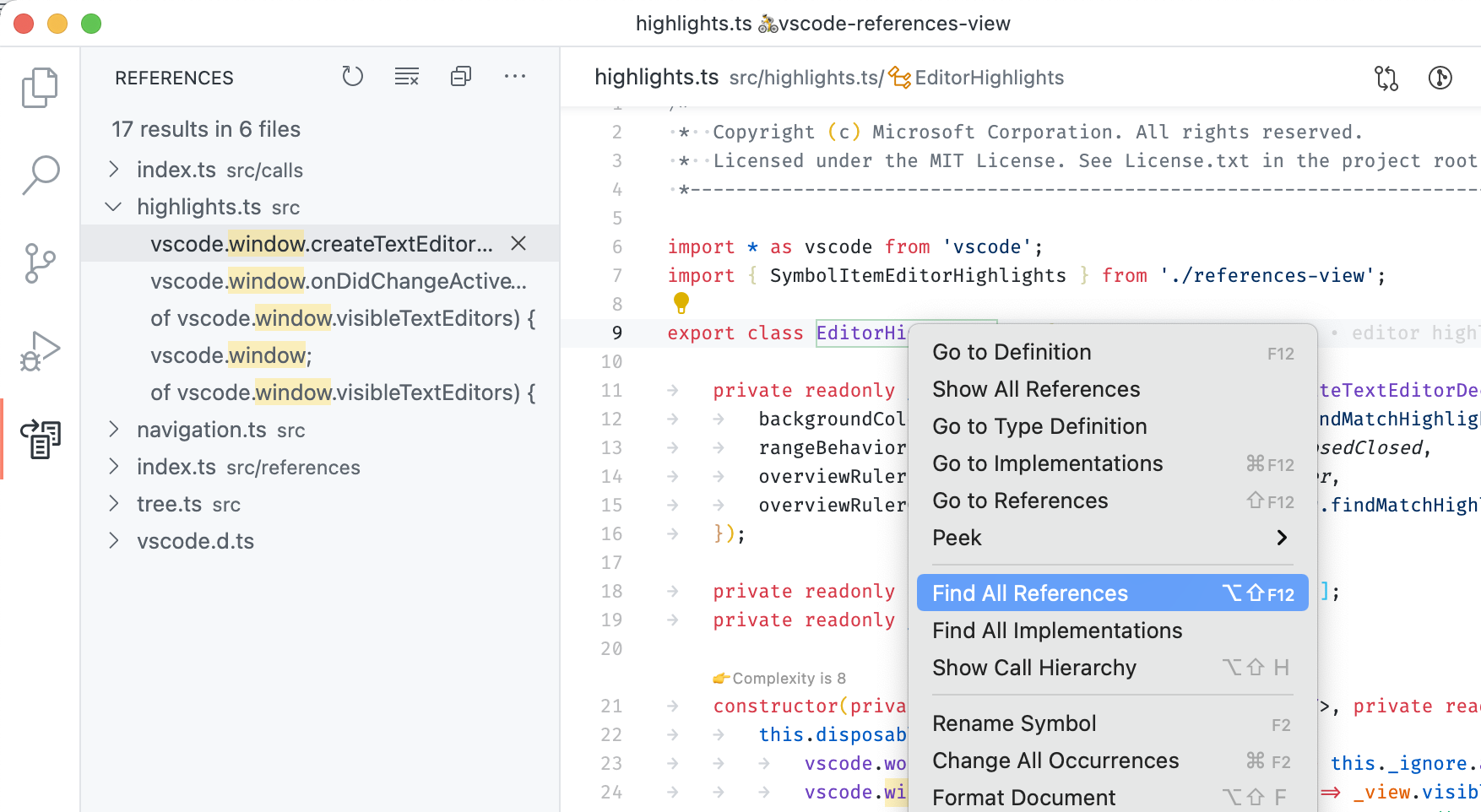
Note that this extension is bundled with Visual Studio Code version 1.29 and later - it doesn't need to be installed anymore.
Requirements
This extension is just an alternative UI for reference search and extensions implementing reference search must still be installed.
Issues
This extension ships with Visual Studio Code and uses its issue tracker. Please file issue here: https://github.com/Microsoft/vscode/issues
Contributing
This project welcomes contributions and suggestions. Most contributions require you to agree to a Contributor License Agreement (CLA) declaring that you have the right to, and actually do, grant us the rights to use your contribution. For details, visit https://cla.microsoft.com.
When you submit a pull request, a CLA-bot will automatically determine whether you need to provide a CLA and decorate the PR appropriately (e.g., label, comment). Simply follow the instructions provided by the bot. You will only need to do this once across all repos using our CLA.
This project has adopted the Microsoft Open Source Code of Conduct. For more information see the Code of Conduct FAQ or contact opencode@microsoft.com with any additional questions or comments.