 Robo
8748be1f1a
Robo
8748be1f1a
* feat: update to Electron v42

* chore: drop support for arm 32-bit server

* chore: update types/node to v24.x

* chore: temporarily lock the target version for build/

* chore: update v8-source-location.patch

* chore: fix clippy

* chore: cleanup armhf server ci config

* fix: broken lock file

* fix: c++ version requirement for sysroot builds

* fix: msvc compilation of native modules

* fix: handle rejections for fire-and-forget loadurl

* fix: windows build

* ci: fix teardown of daemon process on windows

```
2026-05-15T20:55:09.7717127Z Assertion failed: !(handle->flags & UV_HANDLE_CLOSING), file src\win\async.c, line 76
```

* chore: update deb and rpm dependencies

* chore: update version info

* spec: improve reliablity of offscreencanvas tests

* spec: retry EPERM failures on teardown

* chore: update x86_64 rpm deps

* ci: exclude server binskim for armhf

* temp: bump distro

* test: ignore deprecation warnings treated as errors

* chore: update lockfile

* fix: externalize electron from auth extension bundles

 Error: Cannot find module 'c:\Users\cloudtest\AppData\Local\Temp\vscode-sanityQvCaze\vscode-server-win32-x64-web\extensions\github-authentication\dist\install.js'
     at Module._resolveFilename (node:internal/modules/cjs/loader:1476:15)
     at wrapResolveFilename (node:internal/modules/cjs/loader:1049:27)
     at defaultResolveImplForCJSLoading (node:internal/modules/cjs/loader:1073:10)
     at resolveForCJSWithHooks (node:internal/modules/cjs/loader:1094:12)
     at Module._load (node:internal/modules/cjs/loader:1262:25)
     at wrapModuleLoad (node:internal/modules/cjs/loader:255:19)
     at Module.executeUserEntryPoint [as runMain] (node:internal/modules/run_main:154:5)
     at node:internal/main/run_main_module:33:47 {
   code: 'MODULE_NOT_FOUND',
   requireStack: []
 }

 Node.js v24.15.0

* test: make wsl sanity tests reliable

* chore: bump electron@42.1.0

* temp: bump distro

* chore: bump electron@42.2.0

* chore: bump distro

* chore: update debian dependencies

* Revert "test: make wsl sanity tests reliable"

This reverts commit b3f2b63e83.

* test: do not fail for deprecation warnings

* chore: patch node24 server binary for wsl1

* chore: address review feedback

* chore: revert global navigation error handler in browserview

* chore: bump distro
References View
This extension shows reference search results as separate view, just like search results. It complements the peek view presentation that is also built into VS Code. The following features are available:
- List All References via the Command Palette, the Context Menu, or via Alt+Shift+F12
- View references in a dedicated tree view that sits in the sidebar
- Navigate through search results via F4 and Shift+F4
- Remove references from the list via inline commands
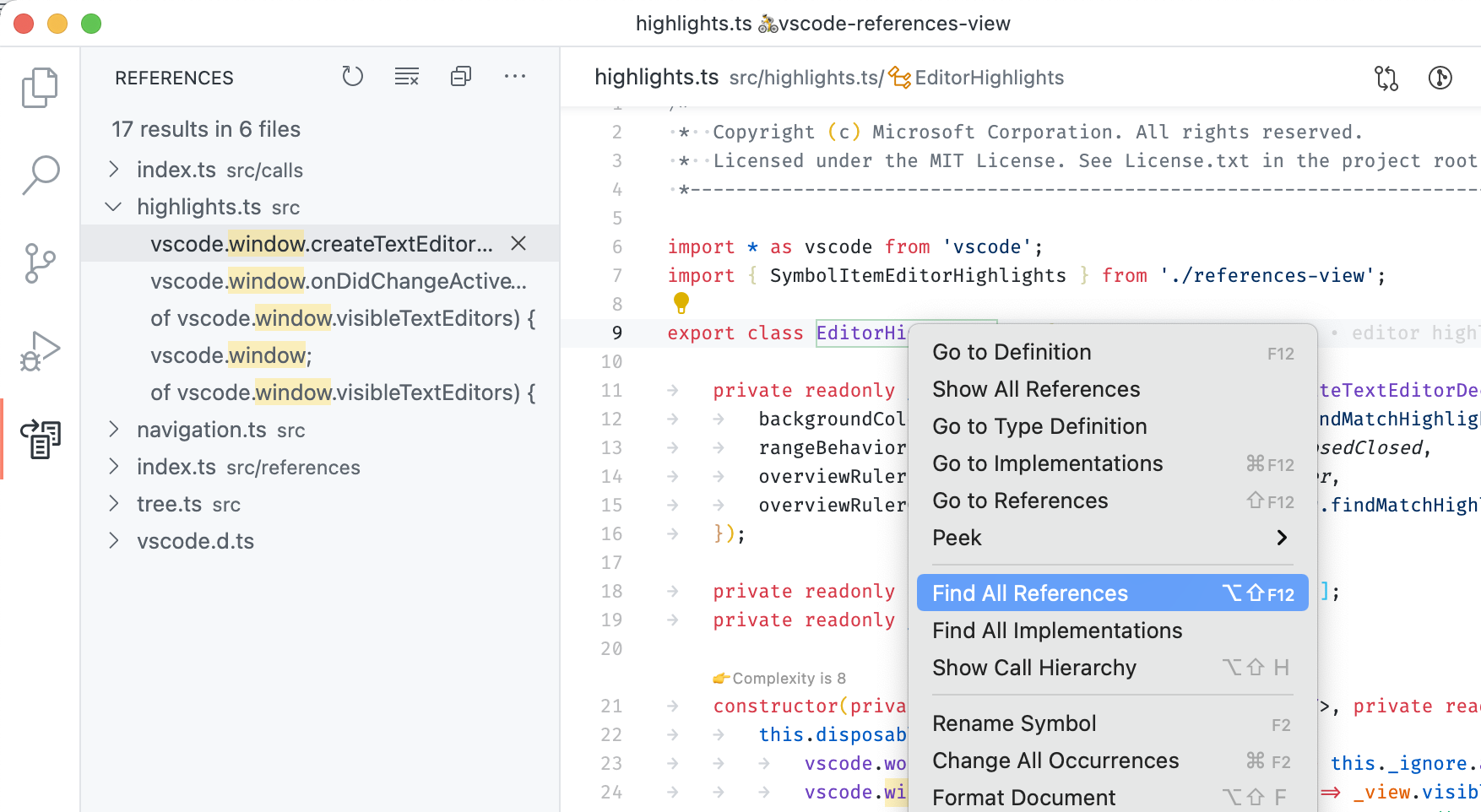
Note that this extension is bundled with Visual Studio Code version 1.29 and later - it doesn't need to be installed anymore.
Requirements
This extension is just an alternative UI for reference search and extensions implementing reference search must still be installed.
Issues
This extension ships with Visual Studio Code and uses its issue tracker. Please file issue here: https://github.com/Microsoft/vscode/issues
Contributing
This project welcomes contributions and suggestions. Most contributions require you to agree to a Contributor License Agreement (CLA) declaring that you have the right to, and actually do, grant us the rights to use your contribution. For details, visit https://cla.microsoft.com.
When you submit a pull request, a CLA-bot will automatically determine whether you need to provide a CLA and decorate the PR appropriately (e.g., label, comment). Simply follow the instructions provided by the bot. You will only need to do this once across all repos using our CLA.
This project has adopted the Microsoft Open Source Code of Conduct. For more information see the Code of Conduct FAQ or contact opencode@microsoft.com with any additional questions or comments.