 Copilot
ca80313cee
Copilot
ca80313cee
* Initial plan

* Add trajectory format types and core implementation

Co-authored-by: zhichli <57812115+zhichli@users.noreply.github.com>

* Add unit tests for trajectory logger and fix implementation

Co-authored-by: zhichli <57812115+zhichli@users.noreply.github.com>

* Add comprehensive documentation for trajectory format

Co-authored-by: zhichli <57812115+zhichli@users.noreply.github.com>

* Add implementation status and next steps documentation

Co-authored-by: zhichli <57812115+zhichli@users.noreply.github.com>

* Add trajectory implementation quick reference summary

* Add trajectory export commands and enhance trajectory logging functionality

* Refactor trajectory metrics calculation and update schema version to ATIF v1.5

* trajectory scaffolding

* Enhance trajectory tracking by adding subAgentName and agentName to tool metadata in SearchSubagentTool and TrajectoryLoggerAdapter

* add export trajectory cmd for tree nodes

* use sessionId for main trajectory

* Update command categories from 'Copilot' to 'Chat' in package.json

* Update trajectory schema version to ATIF-v1.5 and enhance error handling in export commands

* Remove obsolete trajectory documentation and integration files

* Refactor trajectory export commands and update README for clarity

* Update src/platform/trajectory/common/trajectoryLogger.ts

Co-authored-by: Copilot <175728472+Copilot@users.noreply.github.com>

* Update src/platform/trajectory/node/trajectoryLogger.ts

Co-authored-by: Copilot <175728472+Copilot@users.noreply.github.com>

* Update src/platform/trajectory/node/trajectoryLoggerAdapter.ts

Co-authored-by: Copilot <175728472+Copilot@users.noreply.github.com>

* Update src/extension/trajectory/vscode-node/trajectoryExportCommands.ts

Co-authored-by: Copilot <175728472+Copilot@users.noreply.github.com>

* Refactor adapter to avoid double trajectory start and add comprehensive tests

- Remove redundant second startTrajectory call in adapter sync loop
- Add 12 comprehensive tests for TrajectoryLoggerAdapter covering:
  - Basic trajectory creation from request logs
  - User message deduplication
  - Tool call correlation (single, parallel, orphan)
  - Subagent trajectory linking
  - Metrics tracking
  - Session ID management
  - Non-conversation request handling
- Update TestRequestLogger to expose toolMetadata property
- Add async wait in tests for proper event processing

Co-authored-by: zhichli <57812115+zhichli@users.noreply.github.com>

* rm readme

* enhance trajectory export functionality with session ID mapping and folder selection

* add comment

* add arch

* add bounding for logs and rm tests for now

---------

Co-authored-by: copilot-swe-agent[bot] <198982749+Copilot@users.noreply.github.com>
Co-authored-by: zhichli <57812115+zhichli@users.noreply.github.com>
Co-authored-by: Zhichao Li <zhichli@microsoft.com>
Co-authored-by: Copilot <175728472+Copilot@users.noreply.github.com>
GitHub Copilot - Your AI peer programmer
GitHub Copilot is an AI peer programming tool that helps you write code faster and smarter.
GitHub Copilot adapts to your unique needs allowing you to select the best model for your project, customize chat responses with custom instructions, and utilize agent mode for AI-powered, seamlessly integrated peer programming sessions.
Sign up for GitHub Copilot Free!

When you install Copilot in Visual Studio Code, you get two extensions:
- GitHub Copilot - Provides inline coding suggestions as you type.
- GitHub Copilot Chat (this extension) - A companion extension that provides conversational AI assistance.
Getting access to GitHub Copilot
Sign up for GitHub Copilot Free, or request access from your enterprise admin.
To access GitHub Copilot, an active GitHub Copilot subscription is required. You can read more about our business and individual offerings at github.com/features/copilot.
AI-powered coding sessions
Start an AI-powered coding session tailored to your workflow. Copilot Edits allows you to quickly iterate on code changes directly in the editor, across multiple files using natural language. For a more autonomous peer programmer experience, agent mode performs multi-step coding tasks at your command. It automatically handles compile and lint errors, monitors terminal and test output, and iterates until the task is complete. Edit mode offers a conversational, step-by-step coding experience. Engage in multi-turn chat conversations while Copilot applies edits directly to your codebase, allowing you to review changes in context and maintain full control.

Inline suggestions in the editor
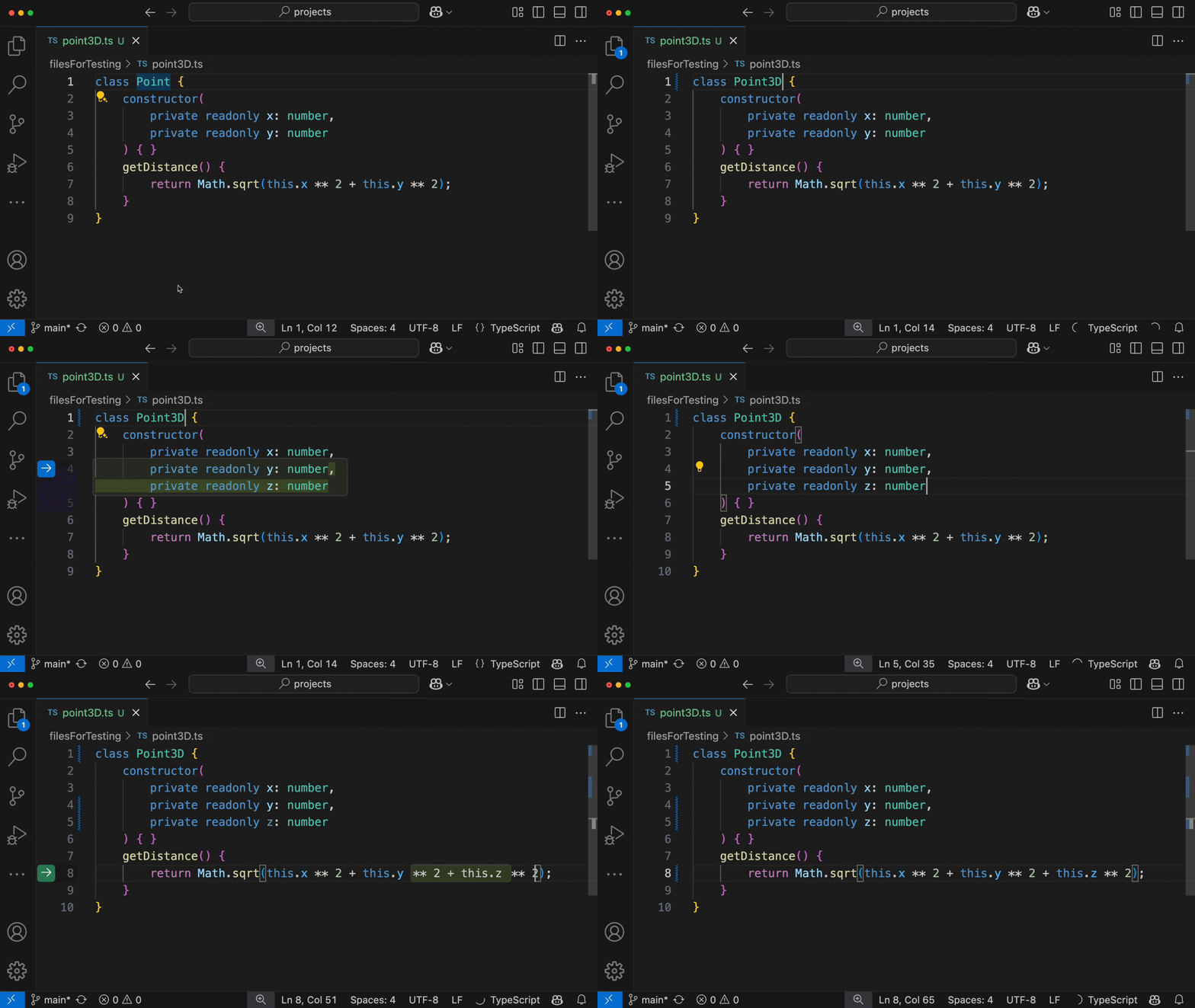
Automatically receive inline suggestions in the editor from ghost text suggestions and next edit suggestions to help you write code faster. Ghost text suggestions provide suggestions at the current location, tailored to your coding style and your existing code. Copilot next edit suggestions (Copilot NES) takes it a step further and predicts what and where your next logical code change will be. Use the Tab key to navigate and accept changes in quick succession.
Ask and learn about your code with chat
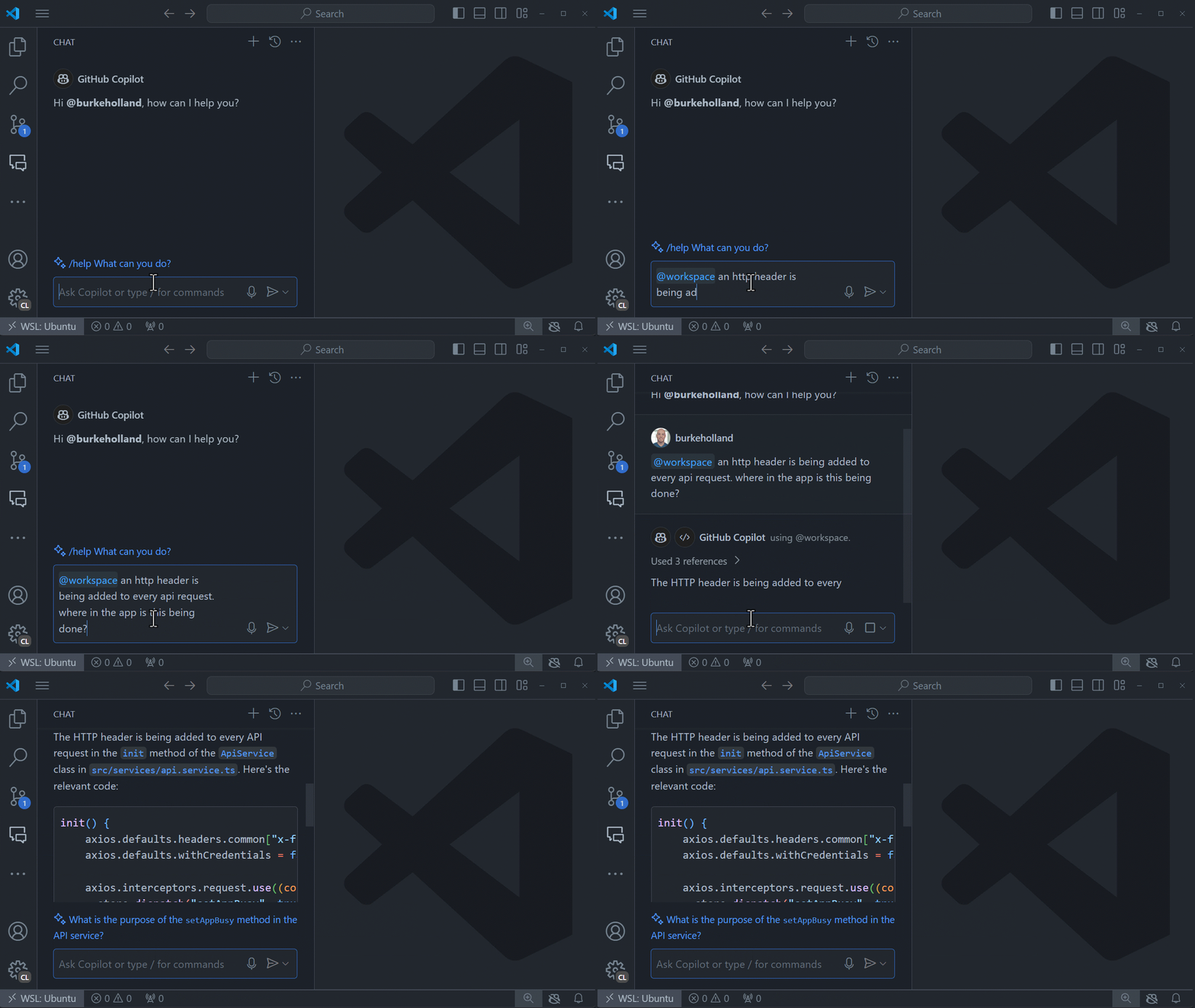
Ask Copilot for help with any task or question in the Chat view, bringing in code from your current files. Rather than giving you a generic answer, it can give answers that are relevant for your codebase using information provided by participants, variables, and slash commands.
Apply Copilot's AI suggestions directly to your code using Inline chat, staying in the flow. Need help with refactoring a method, adding error handling, or explaining a complex algorithm - just launch Copilot in the editor!

Supported languages and frameworks
GitHub Copilot works on any language, including Java, PHP, Python, JavaScript, Ruby, Go, C#, or C++. Because it’s been trained on languages in public repositories, it works for most popular languages, libraries and frameworks.
Version compatibility
As Copilot Chat releases in lockstep with VS Code due to its deep UI integration, every new version of Copilot Chat is only compatible with the latest and newest release of VS Code. This means that if you are using an older version of VS Code, you will not be able to use the latest Copilot Chat.
Only the latest Copilot Chat versions will use the latest models provided by the Copilot service, as even minor model upgrades require prompt changes and fixes in the extension.
Privacy and preview terms
By using Copilot Chat you agree to GitHub Copilot chat preview terms. Review the transparency note to understand about usage, limitations and ways to improve Copilot Chat during the technical preview.
Your code is yours. We follow responsible practices in accordance with our Privacy Statement to ensure that your code snippets will not be used as suggested code for other users of GitHub Copilot.
To get the latest security fixes, please use the latest version of the Copilot extension and VS Code.
Resources & next steps
- Sign up for GitHub Copilot Free
- If you're using Copilot for your business, check out Copilot Business and Copilot Enterprise
- Get started with Copilot in VS Code tutorial
- Copilot Chat quickstart video to learn Copilot Chat in less than 4 minutes
- VS Code Copilot Series on YouTube
- FAQ
- Feedback: We'd love to get your help in making GitHub Copilot better!
Data and telemetry
The GitHub Copilot Extension for Visual Studio Code collects usage data and sends it to Microsoft to help improve our products and services. Read our privacy statement to learn more. This extension respects the telemetry.telemetryLevel setting which you can learn more about at https://code.visualstudio.com/docs/supporting/faq#_how-to-disable-telemetry-reporting.
Trademarks
This project may contain trademarks or logos for projects, products, or services. Authorized use of Microsoft trademarks or logos is subject to and must follow Microsoft's Trademark & Brand Guidelines. Use of Microsoft trademarks or logos in modified versions of this project must not cause confusion or imply Microsoft sponsorship. Any use of third-party trademarks or logos are subject to those third-party's policies.
License
Copyright (c) Microsoft Corporation. All rights reserved.
Licensed under the MIT license.