 Christian König
PADD
PADD (formerly Chronometer2) is a more expansive version of the original chronometer.sh that is included with Pi-Hole. PADD provides in-depth information about your Pi-hole.
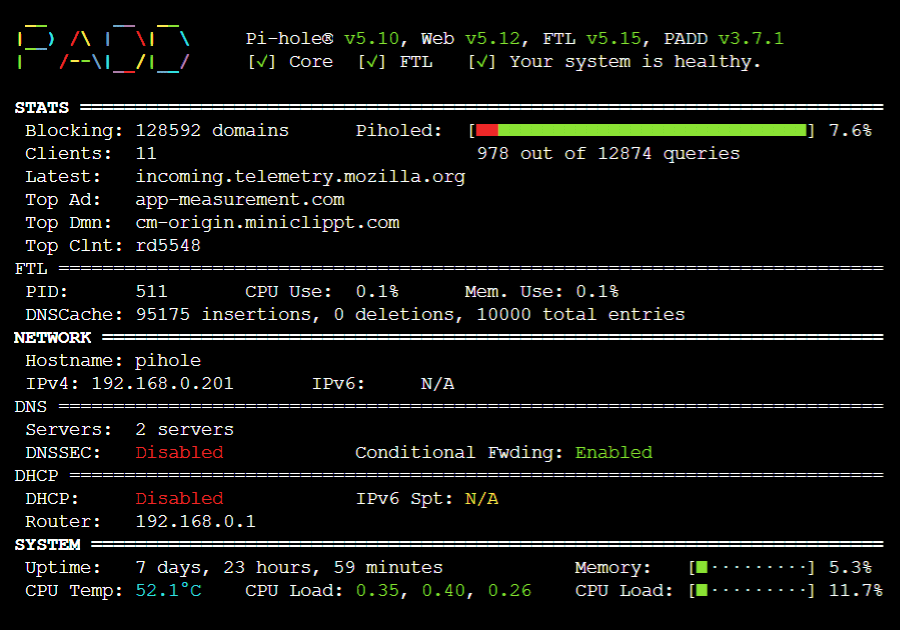
*Note: PADD has been adopted by the Pi-hole team, thanks to JPMCK for creating this helpful tool!
Setup PADD
More in-depth information about setting up PADD can be found in this repo’s wiki.
- Get a copy of PADD by running:
cd ~
wget -N https://raw.githubusercontent.com/pi-hole/PADD/master/padd.sh
- Make PADD executable by running
sudo chmod +x padd.sh
- Set PADD to auto run by adding the following to the end of
~/.bashrc:
# Run PADD
# If we’re on the PiTFT screen (ssh is xterm)
if [ "$TERM" == "linux" ] ; then
  while :
  do
    ./padd.sh
    sleep 1
  done
fi
One line version
cd ~ ; echo "if [ \"\$TERM\" == \"linux\" ] ; then\n while :\n do\n ./padd.sh\n sleep 1\n done\nfi" | tee ~/.bashrc -a
- Reboot your Pi-Hole by running
sudo reboot. PADD should now run when your Pi-Hole has completed booting.
Updating PADD
- Just run
cd ~
wget -N https://raw.githubusercontent.com/pi-hole/PADD/master/padd.sh
Note: if you are already running Chronometer2 v1.3.1 or below, you’ll need to follow these instructions!
Running Pi-hole in a Docker Container
If you're running Pi-hole in a Docker Container you can use padd.sh this way:
Simplest, but quick & dirty solution:
Copy padd.sh to your /etc/pihole volume/mount on your linux host where docker is running. Then execute docker exec pihole /etc/pihole/padd.sh and voila!
Slightly more complicated, but very elegant solution:
If you want padd.sh not mixed up with your config files add this line to your docker_run.sh in your Pi-hole
-v "${PIHOLE_BASE}/opt-padd/:/opt/padd/"
or docker-compose.yml:
volumes:
- './opt-padd/:/opt/padd/'
Where ./opt-padd is your local directory where padd.sh has been copied to (or your cloned git repo).
Then execute docker exec pihole /opt/padd/padd.sh and voila!